
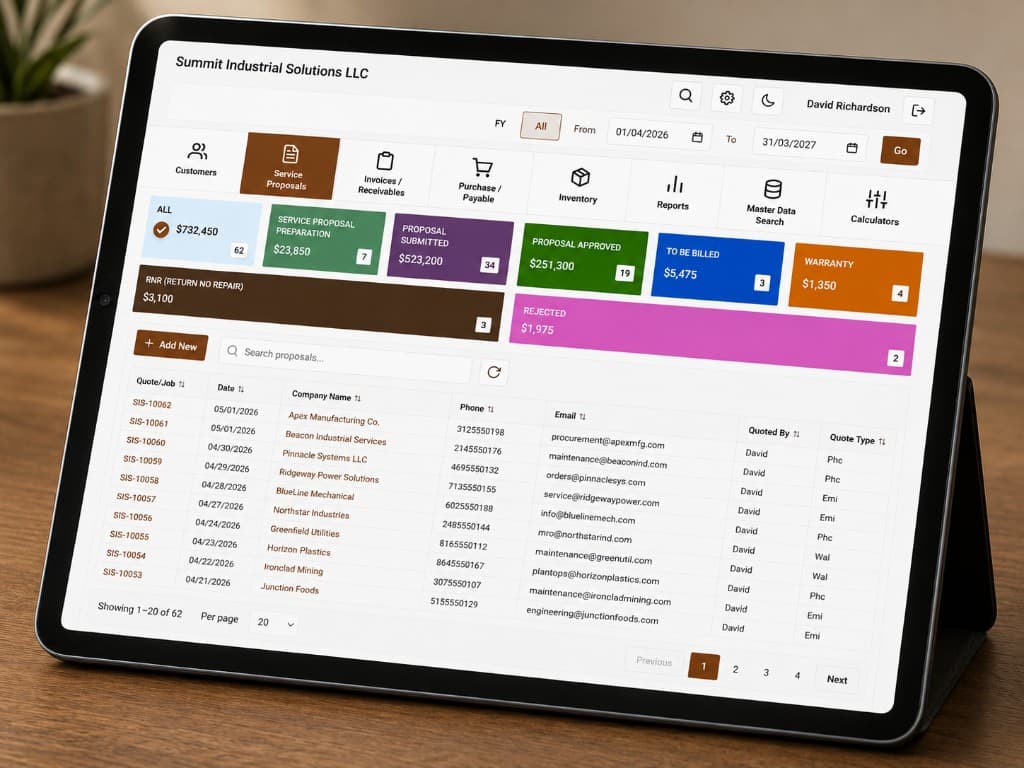
Motor Repair Shop Software, Proposals, Work Orders, Invoices & Inventory in One Place
From first lead through cash collection, vendor buying, payables, sales commissions, and QuickBooks Online sync, one connected workflow instead of scattered spreadsheets and apps. Job Write-Up, job board, inventory, invoicing, repair leads, hiring, and the marketplace are built in too.
- Job Write-Up & quote-to-delivery
- Floor & office in sync
- Repair leads built in
- Careers & job postings for shops
- Marketplace for parts & surplus
- Shop inventory, reservations & low-stock alerts
- QuickBooks Online sync
No more paperwork, more time for your business
Spreadsheets, sticky notes, and separate tools don't scale. Here's why repair shops run on a single system.
One place for every job
From intake on Job Write-Up through quote approval and delivery you keep a single job record, no re-entering motor details, re-typing specs, or chasing paper between center and office. Everyone sees the same job number, status, and history, so handoffs are smooth and nothing falls through the cracks.
Floor and office in sync
Technicians update status from the floor using mobile app; managers see it instantly on the same board. No more walking back to a desk to log progress or guessing where a motor is, the system stays current so scheduling and customer updates are accurate.
Leads that fit your workflow
New repair inquiries land in the same system you use for jobs and customers. You can convert a lead to a customer and work order without re-entering data in another tool, so new business flows into one place and stays trackable from first contact to delivery.
Less admin, more repair work
Invoicing, AR, vendors, shop parts inventory, and receiving live in one place instead of scattered across spreadsheets and other apps. You spend less time switching tools and re-keying data, and more time on the repair work and customer service that actually drive revenue.
Features
Everything you need to run and grow your motor repair center, workflow, operations, shop parts inventory (on-hand, reserved, locations, low-stock), leads, employee job postings on the public Careers page, and a separate public marketplace for surplus and equipment you want to advertise to buyers.
Motor repair workflow
Track every job from the moment it arrives to delivery. Job Write-Up holds intake, inspections, and pipeline quotes; formal RFQs and customer approval live on Quotes; work orders are created from the job’s primary final quote and stay linked to the same job number. Technicians scan job-based Tag QR codes on mobile to update status, so the board always reflects reality. Each capability below is designed to reduce re-entry, keep center and office aligned, and give you one source of truth for every repair.

- Job Write-Up: one job number from intake to approval
Every repair runs as a Job Write-Up with its own job number: intake and inspections, preliminary and final quotes in the pipeline, customer send, job-level attachments, sales commission, and shop actions (print, work order, Tag QR) live together. The team works one continuous record instead of splitting context across disconnected screens.
- Work orders tied to the job | and the approved RFQ
Create work orders from the primary final Shop Management System quote on that job. Motor, customer, scope, and line items carry through; numbering stays aligned with the job so desk and floor share the same ID. Inventory reservations and consumption still follow the quote-backed path through delivery.
- Center floor job board
A visual board with status columns (e.g. Received, Inspection, Rewinding, Testing, Ready) shows exactly where every motor is. Drag or tap to move jobs as work progresses, so the board always reflects reality. Managers get at-a-glance visibility; technicians know what’s next without asking.
- Motor job tags with QR codes (job number)
Print a Tag QR from Job Write-Up; it encodes the repair job number. Technicians scan with the mobile app to open the assigned work order for that job, no walking back to a desk to look up an RFQ. Tap status updates and the job board stays current for everyone.
- Customer's motors registry
Keep a digital record of every motor: serial number, specs, service history, and test results linked to the same motor over time. When a repeat customer sends in a motor, you see past repairs and test data instantly, so you can quote and plan work with full context.
- Quotes (RFQs), editing, and invoicing
Use Quotes to view and edit formal RFQs, manage status, and create invoices. New repair RFQs start from Job Write-Up so they stay linked to the same job number; customer approvals and line items remain visible to the whole team with less duplicate entry.
- Quote parts from shop inventory
Add line items from your master parts catalog directly on the quote: see available quantity (on hand minus what’s reserved for other active jobs), order shortfalls with vendor POs when needed, and let reservations hold stock for the job until delivery. When the work order ships, consumed quantities come off inventory automatically so your books match the floor.
Job management tools
One system for customers, Job Write-Up, Quotes, invoicing, vendors, shop inventory, logistics, and QuickBooks Online. Create invoices from completed work orders, track payments, manage parts on hand and reservations, and push customers, invoices, payments, and vendor POs to QBO when a job closes, so you never re-key the shop floor into accounting. The items below cover how you keep financials, suppliers, stock, and physical flow in sync without leaving the platform.
- Technician mobile app (shop-floor first)
Give technicians a dedicated mobile app to run jobs from the floor: scan Tag QR codes (job number), open assigned work orders, post live status updates, and record motor testing notes/values as work happens. Office and floor stay in sync in real time without extra calls, paper notes, or desk-only updates.
- Customer database and contacts
Store company names, primary and secondary contacts, addresses, and billing details in one place. View full job history and motor records per customer so you can answer questions quickly, spot repeat work, and tailor service, without digging through spreadsheets or old paperwork.
- Billing and invoice creation
Generate invoices from completed work orders and approved quote line items so amounts match what was agreed. Add extra charges or adjustments if needed, then link each invoice to accounts receivable. Everything stays traceable from job to payment.
- Accounts receivable and payment tracking
Track outstanding balances by customer, record payments (including via payment link so customers can pay online), and keep full financial history in one place. Aging reports and payment history help you follow up on past-due accounts and keep cash flow visible.
- Vendor management and purchase orders
Manage suppliers with contact and terms in one list. Create purchase orders for parts and materials, attach vendor invoices when they arrive, and track PO status (open, invoiced, paid). You always know what’s on order and what’s been paid, reducing duplicate orders and missed bills.
- Shop parts inventory and stock control
Run a parts catalog with SKU, unit of measure, on-hand and reserved counts, low-stock alerts, and optional locations (bins or aisles from settings). Manual adds and adjustments keep day-to-day accurate; receiving against vendor POs in logistics bumps stock without double entry. Dashboard reports highlight low inventory so you reorder before jobs wait on parts.
- Receiving and shipping logistics
Log motors and parts in and out: customer motors arriving for repair, vendor deliveries for POs, and shipments back to customers. Each movement can be tied to the relevant work order or PO, so you have a clear chain of custody and can answer “where is it?” in seconds.
- Reports and productivity insights
See revenue, completed jobs, technician workload, and top customers in one system. Use these views to run the business, spot bottlenecks, plan capacity, and understand which customers and job types drive the most value, without exporting to spreadsheets.
- QuickBooks Online integration
Connect QuickBooks Online from Settings → Accounts. When a job reaches your chosen closed status, IQMotorBase syncs customers, invoices, payments, and vendor purchase orders into QBO, so the shop floor and your books stay aligned without re-keying line items.
- API and Shop Management System integrations
An API is available to integrate IQMotorBase.com with any other Shop Management System or business system. Sync customers, work orders, and quotes with your existing tools, build custom workflows, or connect to accounting and ERP, alongside the built-in QuickBooks Online sync, so you can keep one source of truth while using the apps your team already relies on.
- Upload your existing data
Bring your existing customers, motors, and job history into the platform. Upload your data so you can switch without starting from scratch. We support common formats and can help you migrate from spreadsheets or other systems so your records and history stay in one place.
- Public marketplace listings
Publish spare parts, surplus motors, and tools to the IQMotorBase.com marketplace from your dashboard. Each listing gets its own SEO-friendly page; buyers submit a request (no checkout on our site) and you manage follow-up and fulfillment from your Shop Management System alongside work orders and invoices.
- Employee job postings (public careers)
Post open roles for technicians, winders, and shop staff from your Shop Management System. Listings appear on the public Careers page with your shop name and location, and each job gets its own SEO-friendly URL. Candidates apply online; you review applications in the dashboard, so hiring stays in the same system as work orders and customers.
Lead generation network
Get repair inquiries from the IQMotorBase.com directory and local SEO pages. Choose shared or exclusive leads, manage your lead credit balance, and convert won leads into customers and repair jobs in Job Write-Up, so new work flows into the same system you already use. Below is how capture, distribution, credits, and conversion work together to grow your pipeline without extra tools.
- Lead capture from directory and local SEO
Repair inquiries come from the IQMotorBase.com directory and from local search pages (e.g. “electric motor repair Houston” or “emergency motor repair near me”). All leads land in one inbox so you don’t chase inquiries across multiple sites or email threads, you see and respond from a single place.
- Shared and exclusive lead distribution
Choose shared leads (sent to multiple centers so you can compete on service and speed) or exclusive leads (sent only to you). Emergency and high-value jobs can be routed as exclusive, giving you first shot and better conversion without competing against other centers on the same inquiry.
- Lead credit balance and delivery
Top up a lead credit balance; the system deducts credits when a lead is delivered to you. You control spend and budget predictably. When credits are available, you never miss a lead, so you can stay in the flow of new repair opportunities without overcommitting.
- Convert leads to customers and repair jobs
When you win the job, convert the lead into a customer and continue in Job Write-Up (and work orders when you are ready). The inquiry, follow-up, and repair record stay in the same system, no re-entering motor details or customer info into a separate tool. Full history stays in one place for reporting and repeat business.
List excess inventory on the public site
Publish parts, motors, tools, and surplus from your Shop Management System. Each listing gets its own SEO-friendly URL. Buyers search and filter on the marketplace, then send a request, no payment on our portal. You handle follow-up and fulfillment; orders stay in your dashboard.
Post jobs, candidates apply on the site
Shops using the Shop Management System can publish employee job postings that appear on the public Careers page, technicians, winders, and other roles with your business name, location, and an apply flow. You manage listings and applications from the dashboard alongside work orders.
Simple, transparent pricing
One platform. Unlimited users. Everything your motor repair shop needs.
Not sure which fits? Book a demo. We will show you the platform and answer every question before you decide anything.
List your repair company in the directory - Free to list
Add your company to the IQMotorBase.com network. Get found by customers searching for motor repair and rewinding in your area. Free to list, submit your details and we’ll review and publish your listing. With Shop Management System access you can also post employee job openings on our public Careers page.
Frequently Asked Questions
Common questions about motor repair shop software, mobile workflows, and repair leads.
- How much does IQMotorBase cost?
- IQMotorBase is $349 per month on the monthly plan, or $3,235 per year on the annual plan (equivalent to $269 per month, saving $983 per year). Both plans include unlimited users and the full platform. Founder pricing is also available for the first 10 shops at a permanently locked discounted rate. Contact us to check availability.
- Can I import my existing customer and job data?
- Yes. You can upload existing customers, motors, and job history in common formats. We support migration from spreadsheets and other systems so your records stay in one place.
- Does IQMotorBase work on mobile for technicians?
- Yes. The technician mobile app lets floor staff scan job QR codes, update work order status, and log motor testing notes in real time, without going back to a desk.
- How do repair leads work?
- Leads come from the IQMotorBase directory and local SEO pages. You can choose shared leads (sent to multiple shops) or exclusive leads (sent only to you). Credits are deducted when a lead is delivered.
- Does IQMotorBase integrate with QuickBooks Online?
- Yes. Enable QuickBooks Online under Settings → Accounts. When a job reaches your selected closed status, IQMotorBase syncs customers, invoices, payments, and vendor purchase orders to QBO so you do not re-key data between the shop floor and your books.
- Is there an API for integrating with other software?
- Yes. Alongside built-in QuickBooks Online sync, IQMotorBase provides an API to sync customers, work orders, and quotes with your existing Shop Management System, accounting, or ERP tools.
See IQMotorBase in 30 minutes
Book a free demo call. We will show you the full platform, answer every question you have, and tell you honestly whether it is the right fit for your shop. No pressure, no sales pitch.
$349/mo or $3,235/yr. Founder pricing available for first 10 shops.