
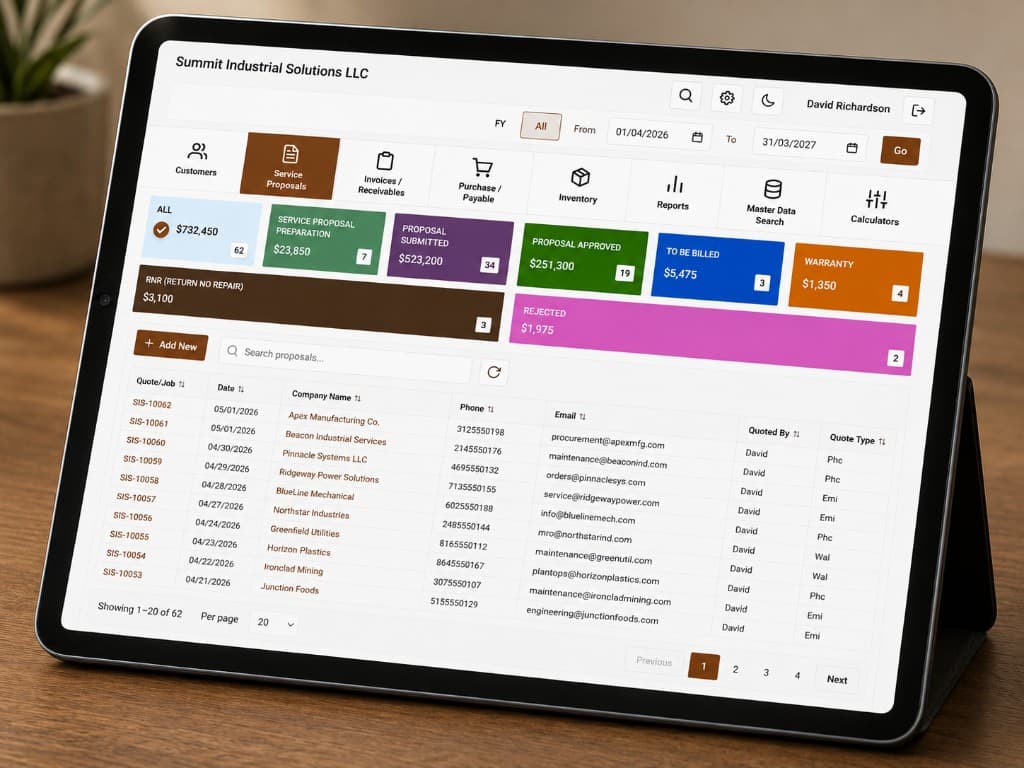
IQMotorBase is shop management software for electric motor repair and rewinding businesses, not general auto repair, not generic field service. Every repair starts as a Job Write-Up with its own job number: intake, inspection notes, preliminary and final quotes, customer send, attachments, shop actions, and the path into work orders and invoices stay on that same record. You are not re-entering motor details and specs across disconnected screens.
The one-sentence difference versus almost every competitor in “motor repair software” search results: IQMotorBase is the only shop system in this cluster that also generates the shop’s leads. Leads come from the public directory and local SEO pages, convert into a customer and Job Write-Up without a second Shop Management System, and sit beside the same inventory, board, and billing tools the floor already uses. If you run a rewind shop and you are tired of spreadsheets for WIP and a separate inbox for inquiries, this page is the map of how the product actually works.
Built for motor repair, not adapted from auto repair
Search “motor repair software” and you will still see tools built for cars, Tekmetric, Shop-Ware, Torque360, and other auto-shop platforms. Those products optimize vehicle repair orders, tire packages, and consumer-facing RO workflows. An electric motor on a stand with coil data, insulation resistance readings, and a customer who asks for last year’s test sheet is a different job. Adapting an auto Shop Management System means stuffing winding notes into a “comments” field and hoping nobody loses the paper slip from the test bench.
IQMotorBase keeps a digital record per motor: serial number, specs, service history, and test results that persist across repeat visits. When a returning customer’s motor comes back, that history is available when you quote new work, not buried in an old PDF folder. The customer registry holds contacts, addresses, billing details, and full job history alongside that motor record.
On the floor, a Tag QR printed from the Job Write-Up encodes the job number. Technicians scan it with the mobile app, open the correct work order, update status, and log testing notes and values without walking back to a desk. The office sees those updates on the same job board. Work orders themselves are created from the job’s primary final quote so motor details, customer, scope, and line items carry through automatically, and numbering stays aligned to the job so floor and office reference the same ID. That chain is motor-shop work. It is not an oil-change form with the labels renamed.
Shop actions on the Job Write-Up include print, generate work order, and generate Tag QR, so the desk is not exporting a PDF into a different “floor system.” Attachments stay on the job. Preliminary and final quotes stay in the pipeline on that same record. When a tech asks which motor is on which stand, the answer is a job number, not a nickname written on masking tape.
For a longer side-by-side look at options shops actually weigh, see our 2026 comparison of software for electric motor repair shops.
Full workflow: Job Write-Up through payment
Picture a Tuesday. A motor arrives. The counter opens a Job Write-Up and assigns a job number. Intake and inspection notes live on that record. Preliminary and final quotes sit in the quote pipeline on the same job, formal RFQs start from the Job Write-Up and stay linked to that number. Quote line items can pull from the shop’s parts catalog so availability is visible while you price the job. When the customer gets the quote and you move forward, you are not starting a second “job” in another app.
When a quote is approved, parts on that quote get reserved: on-hand minus reserved is what you can still promise to other jobs. If the quote needs something you do not have, shortfalls can generate a vendor PO from the quote screen, tied to a supplier you already store with contact and terms. That reservation step is what stops two jobs from being sold against the same physical bearing.
The work order is generated from the job’s primary final quote, not typed up as a disconnected object. Motor details, customer, scope, and line items carry through. Numbering stays aligned to the job. On the job board, status columns (for example Received, Inspection, Rewinding, Testing, Ready, configurable for the shop) show where work sits. Managers drag or tap a job between statuses. Technicians use Tag QR on the floor to open the work order, move status, and enter test values so the board stays current without a second data entry pass at the end of the shift.
When the work order ships, consumed quantities deduct from inventory automatically, no manual double-entry to make the books match the shelf. Invoices are generated from completed work orders and approved quote line items so amounts match what was agreed. Extra charges or adjustments can be added afterward and still link to accounts receivable. Payment tracking includes online payment links, and aging reports support follow-up on past-due accounts. Sales commission data lives at the job level on the Job Write-Up so commission conversations are not a separate spreadsheet after the fact.
Receiving and shipping log motors and parts moving in and out, customer motors arriving, vendor deliveries against POs, shipments back to customers, each tied to the relevant work order or PO so you can answer “where is it right now?” Reports cover revenue, completed jobs, technician workload, and top customers without exporting to a spreadsheet just to see the week. Built-in QuickBooks Online sync pushes customers, invoices, payments, and vendor purchase orders when a job reaches the closed status you configure, so the shop floor does not become a retyping station for accounting. An API is also available to sync customers, work orders, and quotes with other Shop Management System or ERP tools when the shop already relies on those apps, one source of truth for the repair job, not a mandate to rip out accounting overnight.
Low-stock alerts surface on the dashboard so purchasing is not waiting for someone to notice an empty bin after a promise date was already given. Vendor invoices attach to POs; PO status is tracked as open, invoiced, or paid. That purchasing trail sits next to the same parts catalog the quote used, SKU, unit of measure, on-hand, reserved, and optional bin or aisle location when you use locations.
Leads are not a bolt-on form. They originate from the IQMotorBase public directory and local SEO pages (for example city- and service-oriented searches). Shared leads go to multiple shops; exclusive leads go to one shop, used for emergency or high-value work. The shop tops up a lead credit balance; credits deduct when a lead is delivered, not when you decide you “like” it. A won lead becomes a customer and a Job Write-Up without retyping into a separate Shop Management System. That lead-to-job path is the differentiator versus Spring Point, Aptean, Tekmetric, or any generic shop tool that only manages work after the phone already rang. Details live on motor repair shop management system.
Dig into the pieces: work order software for motor repair shops, motor repair inventory software, and invoicing and quoting.
Feature comparison
Use this table as a checklist when someone tries to sell you “shop software” that was built for a different trade. Spring Point (MotorBase / Spring Point Suite) cells below are based on their public site at springpt.com. Where a detail is not stated publicly, the cell says so instead of guessing.
| Capability | IQMotorBase | Spreadsheets | Generic shop software | Spring Point |
|---|---|---|---|---|
| Motor-specific test data on the job | Yes, logged on the work order / mobile floor path | Manual cells / files | Usually vehicle-oriented forms | Yes, MotorBase captures test data on the job; QM Wizard for forms/checklists and tolerances (springpt.com) |
| Lead generation included | Yes, directory + local SEO pages, shared/exclusive credits | No | Typically no | No| Shop Management System manages sales opportunities/prospects; no public claim of originating inbound repair leads for the shop |
| Mobile floor updates (Tag QR) | Yes, scan job number, status + test notes | No | Varies; rarely Tag QR tied to motor WO | Yes, Mobile Paperwork, QM Wizard on tablets/mobile, Time Clock; not the same Tag QR job-number scan path |
| Inventory reservation on quote approval | Yes, reserved vs on-hand; consume on ship | Manual | Often separate or absent | Inventory control; distinguishes available vs sold/allocated even if still on the shelf (public docs do not spell out “reserve on quote approval” in those words) |
| API / integrations | Yes, QuickBooks Online sync (customers, invoices, payments, vendor POs) plus API for Shop Management System/ERP | N/A | Varies by product | Spring Point Connect / Web Services (supplier, payments, storefront, etc. per their suite pages) |
| Pricing model | $349/mo or $3,235/yr (unlimited users). Founder pricing for first 10 shops. | “Free” until errors cost jobs | Usually published SaaS tiers | Monthly subscription by concurrent user licenses + one-time setup/implementation fee (request demo for numbers) |
What it replaces
Spreadsheets, sticky notes, and separate tools don’t scale when the shop has more than a handful of open motors. The counter keeps a WIP sheet. The bench keeps a clipboard. Someone else runs QuickBooks or a stand-alone invoicing tool and retypes line items from a quote PDF. Leads sit in email or a shared inbox that nobody owns after 5 p.m. Parts “knowledge” lives in one person’s head until that person is out sick and a promised date slips.
IQMotorBase consolidates that stack around the Job Write-Up: quotes and work orders on the same job number, reservations and POs from the quote path, board and mobile updates for the floor, invoices and AR for the office, and directory-driven leads that become customers without a second Shop Management System. Built-in QuickBooks Online sync pushes customers, invoices, payments, and vendor POs when a job closes, so accounting does not become another retyping station. Marketplace listings for spare parts, surplus motors, and tools can publish from the dashboard with SEO-friendly URLs when you have surplus to move, there is no on-platform checkout; the buyer sends a request and the shop follows up. Careers postings for technicians and winders can go from the Shop Management System to the public Careers page with the shop’s name and location; candidates apply online and applications are reviewed in the dashboard. None of that requires inventing a parallel process outside the shop system.
Onboarding assumes most prospects are still on spreadsheets. Existing customers, motors, and job history can be uploaded or imported from spreadsheets or other systems. The point is not a flashy empty demo account, it is getting your real names, serials, and open work into the same Job Write-Up path your team will use on Monday.
How leads fill the customer list is covered in depth on motor repair shop management system. For directory scale as proof of the lead side of the product, browse the electric motor repair shops listings. Pricing starts at $349/month or $3,235/year. See pricing or book a free demo. Buyers comparing repair cost context can also read cost of motor repair and rewinding.
Simple, transparent pricing
One platform. Unlimited users. Everything your motor repair shop needs.
or $3,235/year (save $983)
Full platform. Unlimited users. Work orders, leads, inventory, invoicing, QuickBooks sync, and all future updates.
Book a free demoPermanently locked rate. Never increases.
Everything in Standard at a significantly discounted rate, locked in for life. First 10 shops only.
Request founder pricingNot sure which fits? Book a free demo. We will show you the platform before you decide anything.
Frequently asked questions
- How much does IQMotorBase cost?
- IQMotorBase is $349 per month, or $3,235 per year (equivalent to $269 per month, saving $983 per year). Both plans include unlimited users and the full platform. Founder pricing is also available for the first 10 shops at a permanently locked discounted rate. Book a free demo to see the workflow and confirm fit for your shop.
- Can I import my existing customer and job data?
- Yes. Existing customers, motors, and job history can be uploaded or imported from spreadsheets or other systems at onboarding. Migration support is part of getting a shop live.
- Does it work on mobile for technicians?
- Yes. A Tag QR printed from the Job Write-Up encodes the job number. Technicians scan it with the mobile app to open the correct work order, update job status, and log motor testing notes and values from the floor. The office sees those updates on the same job board in real time.
- How is this different from general auto repair shop software?
- IQMotorBase is built for electric motor and rewind shops, not cars. Motor and customer registries carry serial numbers, specs, service history, and test results across visits. Work orders carry motor details and quote-backed line items. Tag QR floor updates and inventory reservation are tied to that same job path. Auto-shop tools are built for oil changes and vehicle RO workflows; they do not replace a motor-specific record.
- Does the software also generate leads for my shop?
- Yes. Leads originate from the IQMotorBase public directory and local SEO pages. Shops can take shared leads (sent to multiple shops) or exclusive leads (one shop only). A credit balance deducts when a lead is delivered. A won lead converts directly into a customer and Job Write-Up, no re-entry into a separate Shop Management System.
- Does IQMotorBase integrate with QuickBooks Online?
- Yes. Connect QuickBooks Online under Settings → Accounts. When a job reaches your selected closed status, IQMotorBase syncs customers, invoices, payments, and vendor purchase orders to QBO so you do not re-key the shop floor into your books.
See IQMotorBase in 30 minutes
Book a free demo call. We will show you the full platform and tell you honestly whether it fits your shop. No pressure.
$349/mo or $3,235/yr. Founder pricing available for first 10 shops.
Related motor repair software guides
- Work order software for motor repair shops
- Motor repair inventory software
- Motor repair shop management system
- Motor repair invoicing & quoting software
- Best software for motor repair shops (2026)
- Motor repair work order template (free)
- Repair shop invoice template (free)
- Pricing
- Electric motor repair shops listings
- Cost of motor repair and rewinding
- Technician mobile app (shop floor first)