
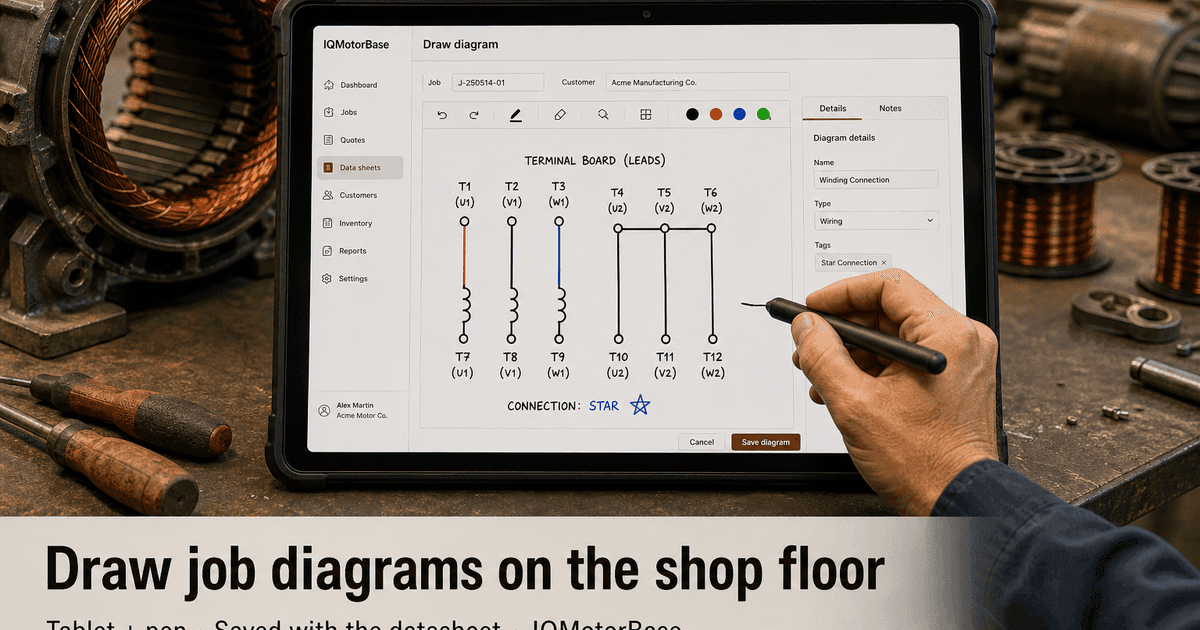
Walk any busy rewind shop at 2 p.m. and you will see the same scene. A tech has the end bell off, leads tagged with tape, and a half-finished sketch on a yellow pad: which coils were burned, how the board was landed, what color went where before someone cut it free. That sketch is not busywork. It is the job's memory. Lose it, and you pay later in rework, arguments, and awkward customer calls.
Most shops already know this. They have tried whiteboards, phone photos, scanned pads, and "just put it in the notes." The failure is rarely effort. The failure is that the drawing does not live with the job number the way nameplate data and quote lines do. So when the motor moves from teardown to rewind to test, the picture that mattered stays behind on a bench, in a text thread, or in a camera roll named IMG_4821.
That is the gap we set out to close. Not another graphics program for the office. A drawing tool that opens from the datasheet on a shop tablet, works with a pen (stylus) the way a tech already sketches, saves on the job, and lets a shop keep more than one diagram when the work needs it.
The problem motor shops actually feel
Motor repair is visual work. Nameplate fields matter, but they do not replace a connection sketch. A DC armature with odd lead dress, a form-wound stator with a special jump, a terminal board that was never factory standard: those details decide whether reassembly matches what the customer had in the plant. When the only record is in one tech's head, you are one vacation day away from a slow, expensive guess.
Paper fails in predictable ways. The pad stays under a pile of scrap copper. Grease smears the lead colors. Someone photocopies a sketch and writes over it, so nobody knows which version is as-found versus as-left. The office asks for "the drawing" when the customer wants a copy with the invoice, and the floor shrugs because that job shipped two weeks ago.
Phone photos feel modern until they are not. The photo is sharp enough on the phone, then too dark on a laptop. It never gets uploaded because the tech was still in gloves. When it does get uploaded, it lands as a generic attachment with no label, next to a packing slip and a random PDF. Second shift opens the job and still has to ask, "Which picture is the board before we moved anything?"
Shared drives and email folders create a different mess. One person saves Motor_Diagram_Final. Another saves Motor_Diagram_Final_v2. A third emails a photo to the estimator and never files it. Months later, on a warranty call, you cannot prove what you documented at teardown. You only have what people remember under pressure.
Generic shop software does not solve this either if "attachments" is the only answer. Attachments are storage. Shops need a place to draw, tied to the same record as the AC or DC datasheet, with a clear way to keep multiple drawings for one motor. Connection map, damage callouts, and as-left layout are not the same page. Forcing them onto one overwritten scan is how details disappear.
What this costs when it goes wrong
Lost diagrams do not show up as a neat line on a P&L. They show up as overtime on a Friday when someone has to open a motor again to "check how it was." They show up as a customer who gets a motor back and says the leads are not how their electrician left them. They show up as an estimator quoting soft because the teardown notes are incomplete, then eating margin when the real connection work appears mid-job.
Handoffs suffer most. Day shift tears down and sketches. Night shift winds. If the sketch is not on the job, night shift either waits, guesses, or texts the day guy. Waiting burns schedule. Guessing burns quality. Texting burns people's personal time and still leaves no permanent record for the next person.
Warranty and liability conversations get harder without a dated drawing on the job. When a plant says, "You changed our connection," you want to open the job and show as-found and as-left, not dig through a group chat. Shops that document well do not win every dispute, but they waste less time proving they did the work carefully.
Training is quieter collateral damage. New techs learn by watching seniors draw. If those drawings vanish, every new hire relearns tribal habits instead of reading a clear job history. That slows capacity even when you hire.
What we built in IQMotorBase
We put the drawing tool where technicians already capture motor truth: inside the datasheet for the job. From the AC or DC datasheet screen, a tech opens Draw/View Diagram and works on a full canvas without bouncing to a separate design app or hoping an email attachment gets filed later. On a shop tablet, that canvas is large enough to sketch at the bench, not hunched over a phone keyboard.
Shops can start on blank paper or from blank designs you control. Platform and shop diagram templates give a consistent background for the sketches your people repeat often. That matters more than it sounds. When every connection diagram starts from the same clean layout, reviews go faster and printouts look like shop standards, not random notebook pages.
Drawing is built for tablet with pen, not desktop art software. A tech can hold a tablet at the motor, use a stylus the same way they use a Sharpie on a pad, and mark lead colors, jumpers, and burned sections while the detail is still in front of them. Pen colors, pen size, eraser, undo, and clear are there for floor markup. Mouse still works at a desk if the office needs to tidy a page, but the primary path is pen on tablet so the sketch happens at teardown, not hours later from memory.
Pressure-friendly pointer input matters on a greasy floor. A pen is faster and more accurate than a fingertip for small connection marks, and it does not force the tech to take gloves off just to type a paragraph. Finish the diagram between steps, save it, and keep moving.
One diagram is rarely enough on a real job. A motor can need an as-found board sketch, a damage map, and an as-left connection page. So a job can hold multiple diagrams. Techs can add another, open an existing one, edit it, replace it, or delete it without wiping the rest of the set. That matches how work actually unfolds across teardown, repair, and final check.
When the drawing is saved, it stays on the service proposal / job record with the datasheet. Print is available when the bench wants a hard copy in a traveler pack, or when the office wants a clean page for the customer. Copying a job forward can carry diagrams with the new RFQ when you need that continuity, instead of starting from a blank memory every time.
Admins and shop settings can manage the blank designs. That lets a shop standardize the templates that match its common frames and connection styles, while still leaving blank paper for the odd job that does not fit a template.
How a job day looks with diagrams on the record
Intake still starts the same way: customer, motor, job number. When the tech opens the datasheet and begins teardown notes, the diagram tool is right there on the tablet. Before leads come off, they sketch the board with the pen. Before a burned section is cut out, they mark it. If the motor is odd enough to need a second page, they add another diagram instead of erasing the first.
Mid-job, the estimator or supervisor can open the same job and see what the floor saw without walking the aisle and interrupting a winding setup. That shortens quote turnaround on complex repairs, because the visual evidence is already attached to the numbers.
At test and ship, the as-left drawing is still on the job. If the customer asks for documentation with the invoice, the office is not hunting. If a warranty call comes six months later, the job history still includes the drawings made when the work was fresh.
This is the same discipline shops already want for statuses and parts: one source of truth. Diagrams finally join that list instead of living as orphan photos.
How it helps owners and floor leads
For owners, the win is less firefighting and cleaner accountability. When documentation is expected on the job, you can coach to a standard: if the connection changed, there should be a drawing. That is easier to manage than "make sure you take a picture sometime."
For floor leads, handoffs get quieter. Night shift stops starting from zero. Cross-trained techs can pick up a job and read the visual story before they touch leads. That protects schedule when absenteeism or rush work scrambles who owns which motor.
For the office, customer communication gets more concrete. You can explain scope with the job open, not with vague promises that "the guys drew it somewhere." When a plant engineer asks for a connection reference, you send what is on the job instead of rebuilding a sketch from memory under deadline pressure.
For quality and warranty posture, dated drawings on the job are evidence of process. They will not replace a formal QA program, but they close the gap where shops lose arguments simply because the record was incomplete.
And for shops already moving quotes, work orders, and invoices onto one job number, diagrams stop being the leftover analog step. They belong in the same motor repair shop management software flow as the rest of the job, including work orders that depend on clear as-found and as-left detail.
What this is not (so expectations stay honest)
This is not CAD for machine design. It will not replace engineering drawings for new apparatus builds. It is a shop-floor diagram tool for repair reality: fast markup, clear enough for the next tech and the customer file, saved on the job.
It also does not remove the need for good habits. A tool only helps if teardown still pauses long enough to capture the board before leads are cut. The difference is that when the tech does the right thing, the work is not wasted two hours later when the pad gets buried.
Shops that win with this treat diagrams like nameplate data: required on complex jobs, reviewed at handoff, and available at ship. Software makes that standard enforceable. Culture still has to ask for it.
A practical way to roll it out in your shop
Start with the jobs that hurt most when sketches vanish: odd connections, DC work, form-wound repairs, and anything with customer-specific lead dress. Require at least one as-found diagram before teardown progresses past the point of no return.
Next, add as-left diagrams on jobs where the connection changed or the customer asked for documentation. Keep damage callouts on a separate diagram when the page would get crowded. Crowded drawings hide the exact thing someone will need later.
Load a few blank designs that match your common work. Train one lead per shift first, then make the expectation clear in the daily huddle: if it was drawn on paper before, it gets drawn on the job now. Review a couple of jobs each week for the first month so the habit sticks.
Measure the quiet wins. Fewer "how was this landed?" interruptions. Fewer warranty debates with no paperwork. Faster answers when a customer asks for a copy. Those are the returns shops feel before they ever look at a dashboard chart.
See it on a live demo
If your team still loses sketches between teardown and ship, a demo is the fastest way to judge fit. We will open a real datasheet flow, draw on a job with tablet and pen in mind, save more than one diagram, print a page, and show how that sits next to quotes and work orders under one job number.
Bring the pain points you already know: second-shift handoffs, warranty documentation, customer requests for connection drawings, or the last job that got reopened because nobody trusted the photo. We will map the tool to those moments, not a generic slideshow.
Book a short walkthrough when you are ready. Fifteen focused minutes beats another month of hoping the next yellow pad does not disappear under the bench.
Free 30-min demo
Book a free demo
Starts at $349/month or $3,235/year. Pick a time below. We will show the Job Write-Up path and answer every question before you decide.
- Free 30-minute live walkthrough on your shop's terms
- $349/mo or $3,235/yr, unlimited users, full platform
- Migration help for customers, motors, and job history
- See Job Write-Ups, work orders, inventory, and leads together
Or leave your details and we will follow up: